Lafayette CollegeTechnology Help
Request a Sponsored Account
Why request a sponsored account?
Sponsored accounts are for volunteers, contractors, consultants, and other affiliates who require a digital identity in order to access digital resources at Lafayette College. Employees may request a digital identity for an affiliate by filling out an online form.
How do I request a sponsored account?
- Log in to https://comanage.lafayette.edu/
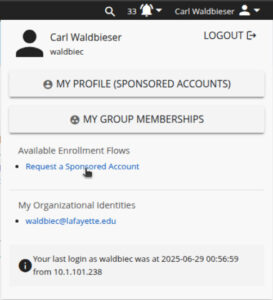
- In the upper right corner of the COmanage Registry web page, click the Login to get a drop-down menu.
- In the drop-down menu, select the “Request a Sponsored Account” link.
The 2nd page of the form allows the sponsoring employee to select the access tier that determines what kinds of resources the affiliate will have access to.
- ID Cards Only – the affiliate will only be eligible to obtain a physical ID card
- Internet – the affiliate may use their NetID to connect to campus wifi and access the Internet
- Dining Services – specialized access for dining services contractors
- Collaboration – Internet access plus productivity services such as Gmail, Office 365, and Zoom
- Employee – access level similar to employee access
- Other – No access is granted. ITS staff will follow up with the sponsoring employee to determine appropriate access levels
Note: If you’re unsure what access tier to select, please email the Help Desk at help@lafayette.edu with information about what services your affiliate will need.
What happens when I submit the request?
Once the form is submitted, the Identity and Access Management (IAM) team will create a digital identity for the affiliate and issue a NetID. The issued NetID will remain active for 365 days. The sponsoring employee and the affiliate will both receive expiration notices 14 and 7 days before expiration. The sponsoring employee may expire or renew their sponsored roles at any time.
- Log in to https://comanage.lafayette.edu/
- In the upper right corner of the COmanage Registry web page, click the Login to get a drop-down menu
- In the drop-down menu, choose “My Profile.”